This is the full developer documentation for Hono.
# Start of Hono documentation
# Hono
Hono - _**means flame🔥 in Japanese**_ - is a small, simple, and ultrafast web framework built on Web Standards.
It works on any JavaScript runtime: Cloudflare Workers, Fastly Compute, Deno, Bun, Vercel, Netlify, AWS Lambda, Lambda@Edge, and Node.js.
Fast, but not only fast.
```ts twoslash
import { Hono } from 'hono'
const app = new Hono()
app.get('/', (c) => c.text('Hono!'))
export default app
```
## Quick Start
Just run this:
::: code-group
```sh [npm]
npm create hono@latest
```
```sh [yarn]
yarn create hono
```
```sh [pnpm]
pnpm create hono@latest
```
```sh [bun]
bun create hono@latest
```
```sh [deno]
deno init --npm hono@latest
```
:::
## Features
- **Ultrafast** 🚀 - The router `RegExpRouter` is really fast. Not using linear loops. Fast.
- **Lightweight** 🪶 - The `hono/tiny` preset is under 14kB. Hono has zero dependencies and uses only the Web Standards.
- **Multi-runtime** 🌍 - Works on Cloudflare Workers, Fastly Compute, Deno, Bun, AWS Lambda, or Node.js. The same code runs on all platforms.
- **Batteries Included** 🔋 - Hono has built-in middleware, custom middleware, third-party middleware, and helpers. Batteries included.
- **Delightful DX** 😃 - Super clean APIs. First-class TypeScript support. Now, we've got "Types".
## Use-cases
Hono is a simple web application framework similar to Express, without a frontend.
But it runs on CDN Edges and allows you to construct larger applications when combined with middleware.
Here are some examples of use-cases.
- Building Web APIs
- Proxy of backend servers
- Front of CDN
- Edge application
- Base server for a library
- Full-stack application
## Who is using Hono?
| Project | Platform | What for? |
| ---------------------------------------------------------------------------------- | ------------------ | ----------------------------------------------------------------------------------------------------------- |
| [cdnjs](https://cdnjs.com) | Cloudflare Workers | A free and open-source CDN service. _Hono is used for the API server_. |
| [Cloudflare D1](https://www.cloudflare.com/developer-platform/d1/) | Cloudflare Workers | Serverless SQL databases. _Hono is used for the internal API server_. |
| [Cloudflare Workers KV](https://www.cloudflare.com/developer-platform/workers-kv/) | Cloudflare Workers | Serverless key-value database. _Hono is used for the internal API server_. |
| [BaseAI](https://baseai.dev) | Local AI Server | Serverless AI agent pipes with memory. An open-source agentic AI framework for web. _API server with Hono_. |
| [Unkey](https://unkey.dev) | Cloudflare Workers | An open-source API authentication and authorization. _Hono is used for the API server_. |
| [OpenStatus](https://openstatus.dev) | Bun | An open-source website & API monitoring platform. _Hono is used for the API server_. |
| [Deno Benchmarks](https://deno.com/benchmarks) | Deno | A secure TypeScript runtime built on V8. _Hono is used for benchmarking_. |
| [Clerk](https://clerk.com) | Cloudflare Workers | An open-source User Management Platform. _Hono is used for the API server_. |
And the following.
- [Drivly](https://driv.ly/) - Cloudflare Workers
- [repeat.dev](https://repeat.dev/) - Cloudflare Workers
Do you want to see more? See [Who is using Hono in production?](https://github.com/orgs/honojs/discussions/1510).
## Hono in 1 minute
A demonstration to create an application for Cloudflare Workers with Hono.

## Ultrafast
**Hono is the fastest**, compared to other routers for Cloudflare Workers.
```
Hono x 402,820 ops/sec ±4.78% (80 runs sampled)
itty-router x 212,598 ops/sec ±3.11% (87 runs sampled)
sunder x 297,036 ops/sec ±4.76% (77 runs sampled)
worktop x 197,345 ops/sec ±2.40% (88 runs sampled)
Fastest is Hono
✨ Done in 28.06s.
```
See [more benchmarks](/docs/concepts/benchmarks).
## Lightweight
**Hono is so small**. With the `hono/tiny` preset, its size is **under 14KB** when minified. There are many middleware and adapters, but they are bundled only when used. For context, the size of Express is 572KB.
```
$ npx wrangler dev --minify ./src/index.ts
⛅️ wrangler 2.20.0
--------------------
⬣ Listening at http://0.0.0.0:8787
- http://127.0.0.1:8787
- http://192.168.128.165:8787
Total Upload: 11.47 KiB / gzip: 4.34 KiB
```
## Multiple routers
**Hono has multiple routers**.
**RegExpRouter** is the fastest router in the JavaScript world. It matches the route using a single large Regex created before dispatch. With **SmartRouter**, it supports all route patterns.
**LinearRouter** registers the routes very quickly, so it's suitable for an environment that initializes applications every time. **PatternRouter** simply adds and matches the pattern, making it small.
See [more information about routes](/docs/concepts/routers).
## Web Standards
Thanks to the use of the **Web Standards**, Hono works on a lot of platforms.
- Cloudflare Workers
- Cloudflare Pages
- Fastly Compute
- Deno
- Bun
- Vercel
- AWS Lambda
- Lambda@Edge
- Others
And by using [a Node.js adapter](https://github.com/honojs/node-server), Hono works on Node.js.
See [more information about Web Standards](/docs/concepts/web-standard).
## Middleware & Helpers
**Hono has many middleware and helpers**. This makes "Write Less, do more" a reality.
Out of the box, Hono provides middleware and helpers for:
- [Basic Authentication](/docs/middleware/builtin/basic-auth)
- [Bearer Authentication](/docs/middleware/builtin/bearer-auth)
- [Body Limit](/docs/middleware/builtin/body-limit)
- [Cache](/docs/middleware/builtin/cache)
- [Compress](/docs/middleware/builtin/compress)
- [Context Storage](/docs/middleware/builtin/context-storage)
- [Cookie](/docs/helpers/cookie)
- [CORS](/docs/middleware/builtin/cors)
- [ETag](/docs/middleware/builtin/etag)
- [html](/docs/helpers/html)
- [JSX](/docs/guides/jsx)
- [JWT Authentication](/docs/middleware/builtin/jwt)
- [Logger](/docs/middleware/builtin/logger)
- [Language](/docs/middleware/builtin/language)
- [Pretty JSON](/docs/middleware/builtin/pretty-json)
- [Secure Headers](/docs/middleware/builtin/secure-headers)
- [SSG](/docs/helpers/ssg)
- [Streaming](/docs/helpers/streaming)
- [GraphQL Server](https://github.com/honojs/middleware/tree/main/packages/graphql-server)
- [Firebase Authentication](https://github.com/honojs/middleware/tree/main/packages/firebase-auth)
- [Sentry](https://github.com/honojs/middleware/tree/main/packages/sentry)
- Others!
For example, adding ETag and request logging only takes a few lines of code with Hono:
```ts
import { Hono } from 'hono'
import { etag } from 'hono/etag'
import { logger } from 'hono/logger'
const app = new Hono()
app.use(etag(), logger())
```
See [more information about Middleware](/docs/concepts/middleware).
## Developer Experience
Hono provides a delightful "**Developer Experience**".
Easy access to Request/Response thanks to the `Context` object.
Moreover, Hono is written in TypeScript. Hono has "**Types**".
For example, the path parameters will be literal types.
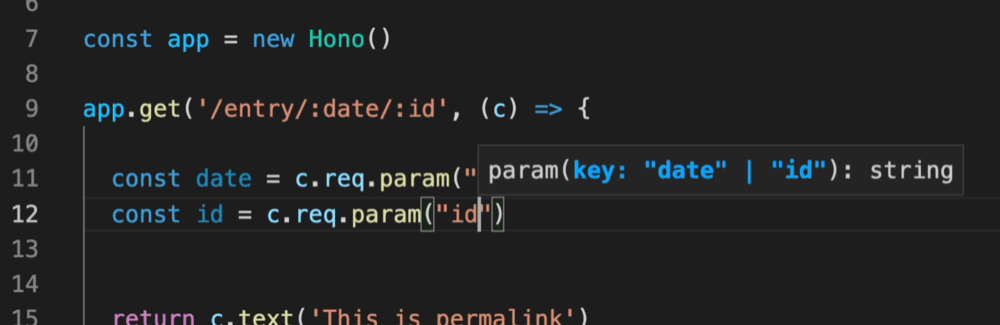
And, the Validator and Hono Client `hc` enable the RPC mode. In RPC mode,
you can use your favorite validator such as Zod and easily share server-side API specs with the client and build type-safe applications.
See [Hono Stacks](/docs/concepts/stacks).
# Helpers
Helpers are available to assist in developing your application. Unlike middleware, they don't act as handlers, but rather provide useful functions.
For instance, here's how to use the [Cookie helper](/docs/helpers/cookie):
```ts
import { getCookie, setCookie } from 'hono/cookie'
const app = new Hono()
app.get('/cookie', (c) => {
const yummyCookie = getCookie(c, 'yummy_cookie')
// ...
setCookie(c, 'delicious_cookie', 'macha')
//
})
```
## Available Helpers
- [Accepts](/docs/helpers/accepts)
- [Adapter](/docs/helpers/adapter)
- [Cookie](/docs/helpers/cookie)
- [css](/docs/helpers/css)
- [Dev](/docs/helpers/dev)
- [Factory](/docs/helpers/factory)
- [html](/docs/helpers/html)
- [JWT](/docs/helpers/jwt)
- [SSG](/docs/helpers/ssg)
- [Streaming](/docs/helpers/streaming)
- [Testing](/docs/helpers/testing)
- [WebSocket](/docs/helpers/websocket)
# Middleware
Middleware works before/after the endpoint `Handler`. We can get the `Request` before dispatching or manipulate the `Response` after dispatching.
## Definition of Middleware
- Handler - should return `Response` object. Only one handler will be called.
- Middleware - should `await next()` and return nothing to call the next Middleware, **or** return a `Response` to early-exit.
The user can register middleware using `app.use` or using `app.HTTP_METHOD` as well as the handlers. For this feature, it's easy to specify the path and the method.
```ts
// match any method, all routes
app.use(logger())
// specify path
app.use('/posts/*', cors())
// specify method and path
app.post('/posts/*', basicAuth())
```
If the handler returns `Response`, it will be used for the end-user and will stop processing.
```ts
app.post('/posts', (c) => c.text('Created!', 201))
```
In this case, four middleware are processed before dispatching like this:
```ts
logger() -> cors() -> basicAuth() -> *handler*
```
## Execution order
The order in which Middleware is executed is determined by the order in which it is registered.
The process before the `next` of the first registered Middleware is executed first,
and the process after the `next` is executed last.
See below.
```ts
app.use(async (_, next) => {
console.log('middleware 1 start')
await next()
console.log('middleware 1 end')
})
app.use(async (_, next) => {
console.log('middleware 2 start')
await next()
console.log('middleware 2 end')
})
app.use(async (_, next) => {
console.log('middleware 3 start')
await next()
console.log('middleware 3 end')
})
app.get('/', (c) => {
console.log('handler')
return c.text('Hello!')
})
```
Result is the following.
```
middleware 1 start
middleware 2 start
middleware 3 start
handler
middleware 3 end
middleware 2 end
middleware 1 end
```
Note that if the handler or any middleware throws, hono will catch it and either pass it to [your app.onError() callback](/docs/api/hono#error-handling) or automatically convert it to a 500 response before returning it up the chain of middleware. This means that next() will never throw, so there is no need to wrap it in a try/catch/finally.
## Built-in Middleware
Hono has built-in middleware.
```ts
import { Hono } from 'hono'
import { poweredBy } from 'hono/powered-by'
import { logger } from 'hono/logger'
import { basicAuth } from 'hono/basic-auth'
const app = new Hono()
app.use(poweredBy())
app.use(logger())
app.use(
'/auth/*',
basicAuth({
username: 'hono',
password: 'acoolproject',
})
)
```
::: warning
In Deno, it is possible to use a different version of middleware than the Hono version, but this can lead to bugs.
For example, this code is not working because the version is different.
```ts
import { Hono } from 'jsr:@hono/hono@4.4.0'
import { upgradeWebSocket } from 'jsr:@hono/hono@4.4.5/deno'
const app = new Hono()
app.get(
'/ws',
upgradeWebSocket(() => ({
// ...
}))
)
```
:::
## Custom Middleware
You can write your own middleware directly inside `app.use()`:
```ts
// Custom logger
app.use(async (c, next) => {
console.log(`[${c.req.method}] ${c.req.url}`)
await next()
})
// Add a custom header
app.use('/message/*', async (c, next) => {
await next()
c.header('x-message', 'This is middleware!')
})
app.get('/message/hello', (c) => c.text('Hello Middleware!'))
```
However, embedding middleware directly within `app.use()` can limit its reusability. Therefore, we can separate our middleware into different files.
To ensure we don't lose type definitions for `context` and `next`, when separating middleware, we can use [`createMiddleware()`](/docs/helpers/factory#createmiddleware) from Hono's factory. This also allows us to type-safely [access data we've `set` in `Context`](https://hono.dev/docs/api/context#set-get) from downstream handlers.
```ts
import { createMiddleware } from 'hono/factory'
const logger = createMiddleware(async (c, next) => {
console.log(`[${c.req.method}] ${c.req.url}`)
await next()
})
```
:::info
Type generics can be used with `createMiddleware`:
```ts
createMiddleware<{Bindings: Bindings}>(async (c, next) =>
```
:::
### Modify the Response After Next
Additionally, middleware can be designed to modify responses if necessary:
```ts
const stripRes = createMiddleware(async (c, next) => {
await next()
c.res = undefined
c.res = new Response('New Response')
})
```
## Context access inside Middleware arguments
To access the context inside middleware arguments, directly use the context parameter provided by `app.use`. See the example below for clarification.
```ts
import { cors } from 'hono/cors'
app.use('*', async (c, next) => {
const middleware = cors({
origin: c.env.CORS_ORIGIN,
})
return middleware(c, next)
})
```
### Extending the Context in Middleware
To extend the context inside middleware, use `c.set`. You can make this type-safe by passing a `{ Variables: { yourVariable: YourVariableType } }` generic argument to the `createMiddleware` function.
```ts
import { createMiddleware } from 'hono/factory'
const echoMiddleware = createMiddleware<{
Variables: {
echo: (str: string) => string
}
}>(async (c, next) => {
c.set('echo', (str) => str)
await next()
})
app.get('/echo', echoMiddleware, (c) => {
return c.text(c.var.echo('Hello!'))
})
```
### Type Inference Across Chained Middleware
When you chain multiple middleware using `.use()`, Hono automatically accumulates the `Variables` types. Route handlers that follow the middleware chain can access all variables from every preceding middleware in a type-safe way:
```ts
import { createMiddleware } from 'hono/factory'
const authMiddleware = createMiddleware<{
Variables: { user: { id: string; name: string } }
}>(async (c, next) => {
c.set('user', { id: '123', name: 'Alice' })
await next()
})
const dbMiddleware = createMiddleware<{
Variables: { db: { query: (sql: string) => Promise } }
}>(async (c, next) => {
c.set('db', {
query: async (sql) => {
/* ... */
},
})
await next()
})
const app = new Hono()
.use(authMiddleware)
.use(dbMiddleware)
.get('/', (c) => {
// Both `user` and `db` are available and type-safe
const user = c.var.user // { id: string; name: string }
const db = c.var.db // { query: (sql: string) => Promise }
return c.json({ user })
})
```
This works because each `.use()` call returns a new Hono instance with the merged type, so the type grows as middleware is chained. This eliminates the need to manually declare a combined `Env` type upfront for most use cases.
## Third-party Middleware
Built-in middleware does not depend on external modules, but third-party middleware can depend on third-party libraries. So with them, we may make a more complex application.
We can explore a variety of [third-party middleware](https://hono.dev/docs/middleware/third-party).
For example, we have GraphQL Server Middleware, Sentry Middleware, Firebase Auth Middleware, and others.
# RPC
The RPC feature allows sharing of the API specifications between the server and the client.
First, export the `typeof` your Hono app (commonly called `AppType`)—or just the routes you want available to the client—from your server code.
By accepting `AppType` as a generic parameter, the Hono Client can infer both the input type(s) specified by the Validator, and the output type(s) emitted by handlers returning `c.json()`.
> [!NOTE]
> For the RPC types to work properly in a monorepo, in both the Client's and Server's tsconfig.json files, set `"strict": true` in `compilerOptions`. [Read more.](https://github.com/honojs/hono/issues/2270#issuecomment-2143745118)
## Server
All you need to do on the server side is to write a validator and create a variable `route`. The following example uses [Zod Validator](https://github.com/honojs/middleware/tree/main/packages/zod-validator).
```ts{1}
const route = app.post(
'/posts',
zValidator(
'form',
z.object({
title: z.string(),
body: z.string(),
})
),
(c) => {
// ...
return c.json(
{
ok: true,
message: 'Created!',
},
201
)
}
)
```
Then, export the type to share the API spec with the Client.
```ts
export type AppType = typeof route
```
## Client
On the Client side, import `hc` and `AppType` first.
```ts
import type { AppType } from '.'
import { hc } from 'hono/client'
```
`hc` is a function to create a client. Pass `AppType` as Generics and specify the server URL as an argument.
```ts
const client = hc('http://localhost:8787/')
```
Call `client.{path}.{method}` and pass the data you wish to send to the server as an argument.
```ts
const res = await client.posts.$post({
form: {
title: 'Hello',
body: 'Hono is a cool project',
},
})
```
The `res` is compatible with the "fetch" Response. You can retrieve data from the server with `res.json()`.
```ts
if (res.ok) {
const data = await res.json()
console.log(data.message)
}
```
### Cookies
To make the client send cookies with every request, add `{ 'init': { 'credentials": 'include' } }` to the options when you're creating the client.
```ts
// client.ts
const client = hc('http://localhost:8787/', {
init: {
credentials: 'include',
},
})
// This request will now include any cookies you might have set
const res = await client.posts.$get({
query: {
id: '123',
},
})
```
## Status code
If you explicitly specify the status code, such as `200` or `404`, in `c.json()`, it will be added as a type for passing to the client.
```ts
// server.ts
const app = new Hono().get(
'/posts',
zValidator(
'query',
z.object({
id: z.string(),
})
),
async (c) => {
const { id } = c.req.valid('query')
const post: Post | undefined = await getPost(id)
if (post === undefined) {
return c.json({ error: 'not found' }, 404) // Specify 404
}
return c.json({ post }, 200) // Specify 200
}
)
export type AppType = typeof app
```
You can get the data by the status code.
```ts
// client.ts
const client = hc('http://localhost:8787/')
const res = await client.posts.$get({
query: {
id: '123',
},
})
if (res.status === 404) {
const data: { error: string } = await res.json()
console.log(data.error)
}
if (res.ok) {
const data: { post: Post } = await res.json()
console.log(data.post)
}
// { post: Post } | { error: string }
type ResponseType = InferResponseType
// { post: Post }
type ResponseType200 = InferResponseType<
typeof client.posts.$get,
200
>
```
## Global Response
Hono RPC client doesn't automatically infer response types from global error handlers like `app.onError()` or global middleware. You can use the `ApplyGlobalResponse` type helper to merge global error response types into all routes.
```ts
import type { ApplyGlobalResponse } from 'hono/client'
const app = new Hono()
.get('/api/users', (c) => c.json({ users: ['alice', 'bob'] }, 200))
.onError((err, c) => c.json({ error: err.message }, 500))
type AppWithErrors = ApplyGlobalResponse<
typeof app,
{
500: { json: { error: string } }
}
>
const client = hc('http://localhost')
```
Now the client knows about both success and error responses:
```ts
const res = await client.api.users.$get()
if (res.ok) {
const data = await res.json() // { users: string[] }
}
// InferResponseType includes the global error type
type ResType = InferResponseType
// { users: string[] } | { error: string }
```
You can also define multiple global error status codes at once:
```ts
type AppWithErrors = ApplyGlobalResponse<
typeof app,
{
401: { json: { error: string; message: string } }
500: { json: { error: string; message: string } }
}
>
```
## Not Found
If you want to use a client, you should not use `c.notFound()` for the Not Found response. The data that the client gets from the server cannot be inferred correctly.
```ts
// server.ts
export const routes = new Hono().get(
'/posts',
zValidator(
'query',
z.object({
id: z.string(),
})
),
async (c) => {
const { id } = c.req.valid('query')
const post: Post | undefined = await getPost(id)
if (post === undefined) {
return c.notFound() // ❌️
}
return c.json({ post })
}
)
// client.ts
import { hc } from 'hono/client'
const client = hc('/')
const res = await client.posts[':id'].$get({
param: {
id: '123',
},
})
const data = await res.json() // 🙁 data is unknown
```
Please use `c.json()` and specify the status code for the Not Found Response.
```ts
export const routes = new Hono().get(
'/posts',
zValidator(
'query',
z.object({
id: z.string(),
})
),
async (c) => {
const { id } = c.req.valid('query')
const post = await getPost(id)
if (!post) {
return c.json({ error: 'not found' }, 404) // Specify 404
}
return c.json({ post }, 200) // Specify 200
}
)
```
Alternatively, you can use module augmentation to extend `NotFoundResponse` interface. This allows `c.notFound()` to return a typed response:
```ts
// server.ts
import { Hono, TypedResponse } from 'hono'
declare module 'hono' {
interface NotFoundResponse
extends Response,
TypedResponse<{ error: string }, 404, 'json'> {}
}
const app = new Hono()
.get('/posts/:id', async (c) => {
const post = await getPost(c.req.param('id'))
if (!post) {
return c.notFound()
}
return c.json({ post }, 200)
})
.notFound((c) => c.json({ error: 'not found' }, 404))
export type AppType = typeof app
```
Now the client can correctly infer the 404 response type.
## Path parameters
You can also handle routes that include path parameters or query values.
```ts
const route = app.get(
'/posts/:id',
zValidator(
'query',
z.object({
page: z.coerce.number().optional(), // coerce to convert to number
})
),
(c) => {
// ...
return c.json({
title: 'Night',
body: 'Time to sleep',
})
}
)
```
Both path parameters and query values **must** be passed as `string`, even if the underlying value is of a different type.
Specify the string you want to include in the path with `param`, and any query values with `query`.
```ts
const res = await client.posts[':id'].$get({
param: {
id: '123',
},
query: {
page: '1', // `string`, converted by the validator to `number`
},
})
```
### Multiple parameters
Handle routes with multiple parameters.
```ts
const route = app.get(
'/posts/:postId/:authorId',
zValidator(
'query',
z.object({
page: z.string().optional(),
})
),
(c) => {
// ...
return c.json({
title: 'Night',
body: 'Time to sleep',
})
}
)
```
Add multiple `['']` to specify params in path.
```ts
const res = await client.posts[':postId'][':authorId'].$get({
param: {
postId: '123',
authorId: '456',
},
query: {},
})
```
### Include slashes
`hc` function does not URL-encode the values of `param`. To include slashes in parameters, use [regular expressions](/docs/api/routing#regexp).
```ts
// client.ts
// Requests /posts/123/456
const res = await client.posts[':id'].$get({
param: {
id: '123/456',
},
})
// server.ts
const route = app.get(
'/posts/:id{.+}',
zValidator(
'param',
z.object({
id: z.string(),
})
),
(c) => {
// id: 123/456
const { id } = c.req.valid('param')
// ...
}
)
```
> [!NOTE]
> Basic path parameters without regular expressions do not match slashes. If you pass a `param` containing slashes using the hc function, the server might not route as intended. Encoding the parameters using `encodeURIComponent` is the recommended approach to ensure correct routing.
## Headers
You can append the headers to the request.
```ts
const res = await client.search.$get(
{
//...
},
{
headers: {
'X-Custom-Header': 'Here is Hono Client',
'X-User-Agent': 'hc',
},
}
)
```
To add a common header to all requests, specify it as an argument to the `hc` function.
```ts
const client = hc('/api', {
headers: {
Authorization: 'Bearer TOKEN',
},
})
```
## `init` option
You can pass the fetch's `RequestInit` object to the request as the `init` option. Below is an example of aborting a Request.
```ts
import { hc } from 'hono/client'
const client = hc('http://localhost:8787/')
const abortController = new AbortController()
const res = await client.api.posts.$post(
{
json: {
// Request body
},
},
{
// RequestInit object
init: {
signal: abortController.signal,
},
}
)
// ...
abortController.abort()
```
::: info
A `RequestInit` object defined by `init` takes the highest priority. It could be used to overwrite things set by other options like `body | method | headers`.
:::
## `$url()`
You can get a `URL` object for accessing the endpoint by using `$url()`.
::: warning
You have to pass in an absolute URL for this to work. Passing in a relative URL `/` will result in the following error.
`Uncaught TypeError: Failed to construct 'URL': Invalid URL`
```ts
// ❌ Will throw error
const client = hc('/')
client.api.post.$url()
// ✅ Will work as expected
const client = hc('http://localhost:8787/')
client.api.post.$url()
```
:::
```ts
const route = app
.get('/api/posts', (c) => c.json({ posts }))
.get('/api/posts/:id', (c) => c.json({ post }))
const client = hc('http://localhost:8787/')
let url = client.api.posts.$url()
console.log(url.pathname) // `/api/posts`
url = client.api.posts[':id'].$url({
param: {
id: '123',
},
})
console.log(url.pathname) // `/api/posts/123`
```
### Typed URL
You can pass the base URL as the second type parameter to `hc` to get more precise URL types:
```ts
const client = hc(
'http://localhost:8787/'
)
const url = client.api.posts.$url()
// url is TypedURL with precise type information
// including protocol, host, and path
```
This is useful when you want to use the URL as a type-safe key for libraries like SWR.
## `$path()`
`$path()` is similar to `$url()`, but returns a path string instead of a `URL` object. Unlike `$url()`, it does not include the base URL origin, so it works regardless of the base URL you pass to `hc`.
```ts
const route = app
.get('/api/posts', (c) => c.json({ posts }))
.get('/api/posts/:id', (c) => c.json({ post }))
const client = hc('http://localhost:8787/')
let path = client.api.posts.$path()
console.log(path) // `/api/posts`
path = client.api.posts[':id'].$path({
param: {
id: '123',
},
})
console.log(path) // `/api/posts/123`
```
You can also pass query parameters:
```ts
const path = client.api.posts.$path({
query: {
page: '1',
limit: '10',
},
})
console.log(path) // `/api/posts?page=1&limit=10`
```
## File Uploads
You can upload files using a form body:
```ts
// client
const res = await client.user.picture.$put({
form: {
file: new File([fileToUpload], filename, {
type: fileToUpload.type,
}),
},
})
```
```ts
// server
const route = app.put(
'/user/picture',
zValidator(
'form',
z.object({
file: z.instanceof(File),
})
)
// ...
)
```
## Custom `fetch` method
You can set the custom `fetch` method.
In the following example script for Cloudflare Worker, the Service Bindings' `fetch` method is used instead of the default `fetch`.
```toml
# wrangler.toml
services = [
{ binding = "AUTH", service = "auth-service" },
]
```
```ts
// src/client.ts
const client = hc('http://localhost', {
fetch: c.env.AUTH.fetch.bind(c.env.AUTH),
})
```
## Custom query serializer
You can customize how query parameters are serialized using the `buildSearchParams` option. This is useful when you need bracket notation for arrays or other custom formats:
```ts
const client = hc('http://localhost', {
buildSearchParams: (query) => {
const searchParams = new URLSearchParams()
for (const [k, v] of Object.entries(query)) {
if (v === undefined) {
continue
}
if (Array.isArray(v)) {
v.forEach((item) => searchParams.append(`${k}[]`, item))
} else {
searchParams.set(k, v)
}
}
return searchParams
},
})
```
## Infer
Use `InferRequestType` and `InferResponseType` to know the type of object to be requested and the type of object to be returned.
```ts
import type { InferRequestType, InferResponseType } from 'hono/client'
// InferRequestType
const $post = client.todo.$post
type ReqType = InferRequestType['form']
// InferResponseType
type ResType = InferResponseType
```
## Parsing a Response with type-safety helper
You can use `parseResponse()` helper to easily parse a Response from `hc` with type-safety.
```ts
import { parseResponse, DetailedError } from 'hono/client'
// result contains the parsed response body (automatically parsed based on Content-Type)
const result = await parseResponse(client.hello.$get()).catch(
(e: DetailedError) => {
console.error(e)
}
)
// parseResponse automatically throws an error if response is not ok
```
## Using SWR
You can also use a React Hook library such as [SWR](https://swr.vercel.app).
```tsx
import useSWR from 'swr'
import { hc } from 'hono/client'
import type { InferRequestType } from 'hono/client'
import type { AppType } from '../functions/api/[[route]]'
const App = () => {
const client = hc('/api')
const $get = client.hello.$get
const fetcher =
(arg: InferRequestType) => async () => {
const res = await $get(arg)
return await res.json()
}
const { data, error, isLoading } = useSWR(
'api-hello',
fetcher({
query: {
name: 'SWR',
},
})
)
if (error) return
failed to load
if (isLoading) return
loading...
return
{data?.message}
}
export default App
```
## Using RPC with larger applications
In the case of a larger application, such as the example mentioned in [Building a larger application](/docs/guides/best-practices#building-a-larger-application), you need to be careful about the type of inference.
A simple way to do this is to chain the handlers so that the types are always inferred.
```ts
// authors.ts
import { Hono } from 'hono'
const app = new Hono()
.get('/', (c) => c.json('list authors'))
.post('/', (c) => c.json('create an author', 201))
.get('/:id', (c) => c.json(`get ${c.req.param('id')}`))
export default app
```
```ts
// books.ts
import { Hono } from 'hono'
const app = new Hono()
.get('/', (c) => c.json('list books'))
.post('/', (c) => c.json('create a book', 201))
.get('/:id', (c) => c.json(`get ${c.req.param('id')}`))
export default app
```
You can then import the sub-routers as you usually would, and make sure you chain their handlers as well, since this is the top level of the app in this case, this is the type we'll want to export.
```ts
// index.ts
import { Hono } from 'hono'
import authors from './authors'
import books from './books'
const app = new Hono()
const routes = app.route('/authors', authors).route('/books', books)
export default app
export type AppType = typeof routes
```
You can now create a new client using the registered AppType and use it as you would normally.
## Known issues
### IDE performance
When using RPC, the more routes you have, the slower your IDE will become. One of the main reasons for this is that massive amounts of type instantiations are executed to infer the type of your app.
For example, suppose your app has a route like this:
```ts
// app.ts
export const app = new Hono().get('foo/:id', (c) =>
c.json({ ok: true }, 200)
)
```
Hono will infer the type as follows:
```ts
export const app = Hono().get<
'foo/:id',
'foo/:id',
JSONRespondReturn<{ ok: boolean }, 200>,
BlankInput,
BlankEnv
>('foo/:id', (c) => c.json({ ok: true }, 200))
```
This is a type instantiation for a single route. While the user doesn't need to write these type arguments manually, which is a good thing, it's known that type instantiation takes much time. `tsserver` used in your IDE does this time consuming task every time you use the app. If you have a lot of routes, this can slow down your IDE significantly.
However, we have some tips to mitigate this issue.
#### Hono version mismatch
If your backend is separated from the frontend and lives in a different directory, you need to ensure that the Hono versions match. If you use one Hono version on the backend and another on the frontend, you'll run into issues such as "_Type instantiation is excessively deep and possibly infinite_".

#### TypeScript project references
Like in the case of [Hono version mismatch](#hono-version-mismatch), you'll run into issues if your backend and frontend are separate. If you want to access code from the backend (`AppType`, for example) on the frontend, you need to use [project references](https://www.typescriptlang.org/docs/handbook/project-references.html). TypeScript's project references allow one TypeScript codebase to access and use code from another TypeScript codebase. _(source: [Hono RPC And TypeScript Project References](https://catalins.tech/hono-rpc-in-monorepos/))_.
#### Compile your code before using it (recommended)
`tsc` can do heavy tasks like type instantiation at compile time! Then, `tsserver` doesn't need to instantiate all the type arguments every time you use it. It will make your IDE a lot faster!
Compiling your client including the server app gives you the best performance. Put the following code in your project:
```ts
import { app } from './app'
import { hc } from 'hono/client'
// this is a trick to calculate the type when compiling
export type Client = ReturnType>
export const hcWithType = (...args: Parameters): Client =>
hc(...args)
```
After compiling, you can use `hcWithType` instead of `hc` to get the client with the type already calculated.
```ts
const client = hcWithType('http://localhost:8787/')
const res = await client.posts.$post({
form: {
title: 'Hello',
body: 'Hono is a cool project',
},
})
```
If your project is a monorepo, this solution does fit well. Using a tool like [`turborepo`](https://turbo.build/repo/docs), you can easily separate the server project and the client project and get better integration managing dependencies between them. Here is [a working example](https://github.com/m-shaka/hono-rpc-perf-tips-example).
You can also coordinate your build process manually with tools like `concurrently` or `npm-run-all`.
#### Specify type arguments manually
This is a bit cumbersome, but you can specify type arguments manually to avoid type instantiation.
```ts
const app = new Hono().get<'foo/:id'>('foo/:id', (c) =>
c.json({ ok: true }, 200)
)
```
Specifying just a single type argument makes a difference in performance, while it may take you a lot of time and effort if you have a lot of routes.
#### Split your app and client into multiple files
As described in [Using RPC with larger applications](#using-rpc-with-larger-applications), you can split your app into multiple apps. You can also create a client for each app:
```ts
// authors-cli.ts
import { app as authorsApp } from './authors'
import { hc } from 'hono/client'
const authorsClient = hc('/authors')
// books-cli.ts
import { app as booksApp } from './books'
import { hc } from 'hono/client'
const booksClient = hc('/books')
```
This way, `tsserver` doesn't need to instantiate types for all routes at once.
# Best Practices
Hono is very flexible. You can write your app as you like.
However, there are best practices that are better to follow.
## Don't make "Controllers" when possible
When possible, you should not create "Ruby on Rails-like Controllers".
```ts
// 🙁
// A RoR-like Controller
const booksList = (c: Context) => {
return c.json('list books')
}
app.get('/books', booksList)
```
The issue is related to types. For example, the path parameter cannot be inferred in the Controller without writing complex generics.
```ts
// 🙁
// A RoR-like Controller
const bookPermalink = (c: Context) => {
const id = c.req.param('id') // Can't infer the path param
return c.json(`get ${id}`)
}
```
Therefore, you don't need to create RoR-like controllers and should write handlers directly after path definitions.
```ts
// 😃
app.get('/books/:id', (c) => {
const id = c.req.param('id') // Can infer the path param
return c.json(`get ${id}`)
})
```
## `factory.createHandlers()` in `hono/factory`
If you still want to create a RoR-like Controller, use `factory.createHandlers()` in [`hono/factory`](/docs/helpers/factory). If you use this, type inference will work correctly.
```ts
import { createFactory } from 'hono/factory'
import { logger } from 'hono/logger'
// ...
// 😃
const factory = createFactory()
const middleware = factory.createMiddleware(async (c, next) => {
c.set('foo', 'bar')
await next()
})
const handlers = factory.createHandlers(logger(), middleware, (c) => {
return c.json(c.var.foo)
})
app.get('/api', ...handlers)
```
## Building a larger application
Use `app.route()` to build a larger application without creating "Ruby on Rails-like Controllers".
If your application has `/authors` and `/books` endpoints and you wish to separate files from `index.ts`, create `authors.ts` and `books.ts`.
```ts
// authors.ts
import { Hono } from 'hono'
const app = new Hono()
app.get('/', (c) => c.json('list authors'))
app.post('/', (c) => c.json('create an author', 201))
app.get('/:id', (c) => c.json(`get ${c.req.param('id')}`))
export default app
```
```ts
// books.ts
import { Hono } from 'hono'
const app = new Hono()
app.get('/', (c) => c.json('list books'))
app.post('/', (c) => c.json('create a book', 201))
app.get('/:id', (c) => c.json(`get ${c.req.param('id')}`))
export default app
```
Then, import them and mount on the paths `/authors` and `/books` with `app.route()`.
```ts
// index.ts
import { Hono } from 'hono'
import authors from './authors'
import books from './books'
const app = new Hono()
// 😃
app.route('/authors', authors)
app.route('/books', books)
export default app
```
### If you want to use RPC features
The code above works well for normal use cases.
However, if you want to use the `RPC` feature, you can get the correct type by chaining as follows.
```ts
// authors.ts
import { Hono } from 'hono'
const app = new Hono()
.get('/', (c) => c.json('list authors'))
.post('/', (c) => c.json('create an author', 201))
.get('/:id', (c) => c.json(`get ${c.req.param('id')}`))
export default app
export type AppType = typeof app
```
If you pass the type of the `app` to `hc`, it will get the correct type.
```ts
import type { AppType } from './authors'
import { hc } from 'hono/client'
// 😃
const client = hc('http://localhost') // Typed correctly
```
For more detailed information, please see [the RPC page](/docs/guides/rpc#using-rpc-with-larger-applications).
# Client Components
`hono/jsx` supports not only server side but also client side. This means that it is possible to create an interactive UI that runs in the browser. We call it Client Components or `hono/jsx/dom`.
It is fast and very small. The counter program in `hono/jsx/dom` is only 2.8KB with Brotli compression, but 47.8KB for React.
This section introduces Client Components-specific features.
## Counter example
Here is an example of a simple counter, the same code works as in React.
```tsx
import { useState } from 'hono/jsx'
import { render } from 'hono/jsx/dom'
function Counter() {
const [count, setCount] = useState(0)
return (
Count: {count}
)
}
function App() {
return (
)
}
const root = document.getElementById('root')
render(, root)
```
## `render()`
You can use `render()` to insert JSX components within a specified HTML element.
```tsx
render(, container)
```
You can see full example code here: [Counter example](https://github.com/honojs/examples/tree/main/hono-vite-jsx).
## Hooks compatible with React
hono/jsx/dom has Hooks that are compatible or partially compatible with React. You can learn about these APIs by looking at [the React documentation](https://react.dev/reference/react/hooks).
- `useState()`
- `useEffect()`
- `useRef()`
- `useCallback()`
- `use()`
- `startTransition()`
- `useTransition()`
- `useDeferredValue()`
- `useMemo()`
- `useLayoutEffect()`
- `useReducer()`
- `useDebugValue()`
- `createElement()`
- `memo()`
- `isValidElement()`
- `useId()`
- `createRef()`
- `forwardRef()`
- `useImperativeHandle()`
- `useSyncExternalStore()`
- `useInsertionEffect()`
- `useFormStatus()`
- `useActionState()`
- `useOptimistic()`
## `startViewTransition()` family
The `startViewTransition()` family contains original hooks and functions to handle [View Transitions API](https://developer.mozilla.org/en-US/docs/Web/API/View_Transitions_API) easily. The followings are examples of how to use them.
### 1. An easiest example
You can write a transition using the `document.startViewTransition` shortly with the `startViewTransition()`.
```tsx
import { useState, startViewTransition } from 'hono/jsx'
import { css, Style } from 'hono/css'
export default function App() {
const [showLargeImage, setShowLargeImage] = useState(false)
return (
<>
{!showLargeImage ? (
) : (
)}
)
}
```
### 2. Using `viewTransition()` with `keyframes()`
The `viewTransition()` function allows you to get the unique `view-transition-name`.
You can use it with the `keyframes()`, The `::view-transition-old()` is converted to `::view-transition-old(${uniqueName))`.
```tsx
import { useState, startViewTransition } from 'hono/jsx'
import { viewTransition } from 'hono/jsx/dom/css'
import { css, keyframes, Style } from 'hono/css'
const rotate = keyframes`
from {
rotate: 0deg;
}
to {
rotate: 360deg;
}
`
export default function App() {
const [showLargeImage, setShowLargeImage] = useState(false)
const [transitionNameClass] = useState(() =>
viewTransition(css`
::view-transition-old() {
animation-name: ${rotate};
}
::view-transition-new() {
animation-name: ${rotate};
}
`)
)
return (
<>
{!showLargeImage ? (
) : (
)}
)
}
```
### 3. Using `useViewTransition`
If you want to change the style only during the animation. You can use `useViewTransition()`. This hook returns the `[boolean, (callback: () => void) => void]`, and they are the `isUpdating` flag and the `startViewTransition()` function.
When this hook is used, the Component is evaluated at the following two times.
- Inside the callback of a call to `startViewTransition()`.
- When [the `finish` promise becomes fulfilled](https://developer.mozilla.org/en-US/docs/Web/API/ViewTransition/finished)
```tsx
import { useState, useViewTransition } from 'hono/jsx'
import { viewTransition } from 'hono/jsx/dom/css'
import { css, keyframes, Style } from 'hono/css'
const rotate = keyframes`
from {
rotate: 0deg;
}
to {
rotate: 360deg;
}
`
export default function App() {
const [isUpdating, startViewTransition] = useViewTransition()
const [showLargeImage, setShowLargeImage] = useState(false)
const [transitionNameClass] = useState(() =>
viewTransition(css`
::view-transition-old() {
animation-name: ${rotate};
}
::view-transition-new() {
animation-name: ${rotate};
}
`)
)
return (
<>
{!showLargeImage ? (
) : (
)}
)
}
```
## The `hono/jsx/dom` runtime
There is a small JSX Runtime for Client Components. Using this will result in smaller bundled results than using `hono/jsx`. Specify `hono/jsx/dom` in `tsconfig.json`. For Deno, modify the deno.json.
```json
{
"compilerOptions": {
"jsx": "react-jsx",
"jsxImportSource": "hono/jsx/dom"
}
}
```
Alternatively, you can specify `hono/jsx/dom` in the esbuild transform options in `vite.config.ts`.
```ts
import { defineConfig } from 'vite'
export default defineConfig({
esbuild: {
jsxImportSource: 'hono/jsx/dom',
},
})
```
# Testing
[Vitest]: https://vitest.dev/
Testing is important.
In actuality, it is easy to test Hono's applications.
The way to create a test environment differs from each runtime, but the basic steps are the same.
In this section, let's test with Cloudflare Workers and [Vitest].
::: tip
Cloudflare recommends using [Vitest] with [@cloudflare/vitest-pool-workers](https://www.npmjs.com/package/@cloudflare/vitest-pool-workers). For more details, please refer to [Vitest integration](https://developers.cloudflare.com/workers/testing/vitest-integration/) in the Cloudflare Workers docs.
:::
## Request and Response
All you need to do is create a Request and pass it to the Hono application to validate the Response. You can then use the useful `app.request` method.
::: tip
For a typed test client see the [testing helper](/docs/helpers/testing).
:::
For example, consider an application that provides the following REST API.
```ts
app.get('/posts', (c) => {
return c.text('Many posts')
})
app.post('/posts', (c) => {
return c.json(
{
message: 'Created',
},
201,
{
'X-Custom': 'Thank you',
}
)
})
```
Make a request to `GET /posts` and test the response.
```ts
describe('Example', () => {
test('GET /posts', async () => {
const res = await app.request('/posts')
expect(res.status).toBe(200)
expect(await res.text()).toBe('Many posts')
})
})
```
To make a request to `POST /posts`, do the following.
```ts
test('POST /posts', async () => {
const res = await app.request('/posts', {
method: 'POST',
})
expect(res.status).toBe(201)
expect(res.headers.get('X-Custom')).toBe('Thank you')
expect(await res.json()).toEqual({
message: 'Created',
})
})
```
To make a request to `POST /posts` with `JSON` data, do the following.
```ts
test('POST /posts', async () => {
const res = await app.request('/posts', {
method: 'POST',
body: JSON.stringify({ message: 'hello hono' }),
headers: new Headers({ 'Content-Type': 'application/json' }),
})
expect(res.status).toBe(201)
expect(res.headers.get('X-Custom')).toBe('Thank you')
expect(await res.json()).toEqual({
message: 'Created',
})
})
```
To make a request to `POST /posts` with `multipart/form-data` data, do the following.
```ts
test('POST /posts', async () => {
const formData = new FormData()
formData.append('message', 'hello')
const res = await app.request('/posts', {
method: 'POST',
body: formData,
})
expect(res.status).toBe(201)
expect(res.headers.get('X-Custom')).toBe('Thank you')
expect(await res.json()).toEqual({
message: 'Created',
})
})
```
You can also pass an instance of the Request class.
```ts
test('POST /posts', async () => {
const req = new Request('http://localhost/posts', {
method: 'POST',
})
const res = await app.request(req)
expect(res.status).toBe(201)
expect(res.headers.get('X-Custom')).toBe('Thank you')
expect(await res.json()).toEqual({
message: 'Created',
})
})
```
In this way, you can test it as like an End-to-End.
## Env
To set `c.env` for testing, you can pass it as the 3rd parameter to `app.request`. This is useful for mocking values like [Cloudflare Workers Bindings](https://hono.dev/getting-started/cloudflare-workers#bindings):
```ts
const MOCK_ENV = {
API_HOST: 'example.com',
DB: {
prepare: () => {
/* mocked D1 */
},
},
}
test('GET /posts', async () => {
const res = await app.request('/posts', {}, MOCK_ENV)
})
```
# JSX
You can write HTML with JSX syntax with `hono/jsx`.
Although `hono/jsx` works on the client, you will probably use it most often when rendering content on the server side. Here are some things related to JSX that are common to both server and client.
## Settings
To use JSX, modify the `tsconfig.json`:
`tsconfig.json`:
```json
{
"compilerOptions": {
"jsx": "react-jsx",
"jsxImportSource": "hono/jsx"
}
}
```
Alternatively, use the pragma directives:
```ts
/** @jsx jsx */
/** @jsxImportSource hono/jsx */
```
For Deno, you have to modify the `deno.json` instead of the `tsconfig.json`:
```json
{
"compilerOptions": {
"jsx": "precompile",
"jsxImportSource": "@hono/hono/jsx"
}
}
```
## Usage
:::info
If you are coming straight from the [Quick Start](/docs/#quick-start), the main file has a `.ts` extension - you need to change it to `.tsx` - otherwise you will not be able to run the application at all. You should additionally modify the `package.json` (or `deno.json` if you are using Deno) to reflect that change (e.g. instead of having `bun run --hot src/index.ts` in dev script, you should have `bun run --hot src/index.tsx`).
:::
`index.tsx`:
```tsx
import { Hono } from 'hono'
import type { FC } from 'hono/jsx'
const app = new Hono()
const Layout: FC = (props) => {
return (
{props.children}
)
}
const Top: FC<{ messages: string[] }> = (props: {
messages: string[]
}) => {
return (
Hello Hono!
{props.messages.map((message) => {
return
{message}!!
})}
)
}
app.get('/', (c) => {
const messages = ['Good Morning', 'Good Evening', 'Good Night']
return c.html()
})
export default app
```
## Metadata hoisting
You can write document metadata tags such as ``, `<link>`, and `<meta>` directly inside your components. These tags will be automatically hoisted to the `<head>` section of the document. This is especially useful when the `<head>` element is rendered far from the component that determines the appropriate metadata.
```tsx
import { Hono } from 'hono'
const app = new Hono()
app.use('*', async (c, next) => {
c.setRenderer((content) => {
return c.html(
<html>
<head></head>
<body>{content}</body>
</html>
)
})
await next()
})
app.get('/about', (c) => {
return c.render(
<>
<title>About Page
about page content
)
})
export default app
```
:::info
When hoisting occurs, existing elements are not removed. Elements appearing later are added to the end. For example, if you have `Default` in your `` and a component renders `Page Title`, both titles will appear in the head.
:::
## Fragment
Use Fragment to group multiple elements without adding extra nodes:
```tsx
import { Fragment } from 'hono/jsx'
const List = () => (
first child
second child
third child
)
```
Or you can write it with `<>` if it sets up properly.
```tsx
const List = () => (
<>
first child
second child
third child
)
```
## `PropsWithChildren`
You can use `PropsWithChildren` to correctly infer a child element in a function component.
```tsx
import { PropsWithChildren } from 'hono/jsx'
type Post = {
id: number
title: string
}
function Component({ title, children }: PropsWithChildren) {
return (
{title}
{children}
)
}
```
## Inserting Raw HTML
To directly insert HTML, use `dangerouslySetInnerHTML`:
```tsx
app.get('/foo', (c) => {
const inner = { __html: 'JSX · SSR' }
const Div =
})
```
## Memoization
Optimize your components by memoizing computed strings using `memo`:
```tsx
import { memo } from 'hono/jsx'
const Header = memo(() => Welcome to Hono)
const Footer = memo(() => )
const Layout = (
Hono is cool!
)
```
## Context
By using `useContext`, you can share data globally across any level of the Component tree without passing values through props.
```tsx
import type { FC } from 'hono/jsx'
import { createContext, useContext } from 'hono/jsx'
const themes = {
light: {
color: '#000000',
background: '#eeeeee',
},
dark: {
color: '#ffffff',
background: '#222222',
},
}
const ThemeContext = createContext(themes.light)
const Button: FC = () => {
const theme = useContext(ThemeContext)
return
}
const Toolbar: FC = () => {
return (
)
}
// ...
app.get('/', (c) => {
return c.html(
)
})
```
## Async Component
`hono/jsx` supports an Async Component, so you can use `async`/`await` in your component.
If you render it with `c.html()`, it will await automatically.
```tsx
const AsyncComponent = async () => {
await new Promise((r) => setTimeout(r, 1000)) // sleep 1s
return
Done!
}
app.get('/', (c) => {
return c.html(
)
})
```
## Suspense
The React-like `Suspense` feature is available.
If you wrap the async component with `Suspense`, the content in the fallback will be rendered first, and once the Promise is resolved, the awaited content will be displayed.
You can use it with `renderToReadableStream()`.
```tsx
import { renderToReadableStream, Suspense } from 'hono/jsx/streaming'
//...
app.get('/', (c) => {
const stream = renderToReadableStream(
loading...}>
)
return c.body(stream, {
headers: {
'Content-Type': 'text/html; charset=UTF-8',
'Transfer-Encoding': 'chunked',
},
})
})
```
## ErrorBoundary
You can catch errors in child components using `ErrorBoundary`.
In the example below, it will show the content specified in `fallback` if an error occurs.
```tsx
function SyncComponent() {
throw new Error('Error')
return
Hello
}
app.get('/sync', async (c) => {
return c.html(
Out of Service}>
)
})
```
`ErrorBoundary` can also be used with async components and `Suspense`.
```tsx
async function AsyncComponent() {
await new Promise((resolve) => setTimeout(resolve, 2000))
throw new Error('Error')
return
Hello
}
app.get('/with-suspense', async (c) => {
return c.html(
Out of Service}>
Loading...}>
)
})
```
## StreamingContext
You can use `StreamingContext` to provide configuration for streaming components like `Suspense` and `ErrorBoundary`. This is useful for adding nonce values to script tags generated by these components for Content Security Policy (CSP).
```tsx
import { Suspense, StreamingContext } from 'hono/jsx/streaming'
// ...
app.get('/', (c) => {
const stream = renderToReadableStream(
Loading...}>
)
return c.body(stream, {
headers: {
'Content-Type': 'text/html; charset=UTF-8',
'Transfer-Encoding': 'chunked',
'Content-Security-Policy':
"script-src 'nonce-random-nonce-value'",
},
})
})
```
The `scriptNonce` value will be automatically added to any `
) : (
)}
 ) : (
)}
) : (
)}